Chart of Accounts
Organize your accounts and customize your chart of accounts structure.
Chart of Accounts
Your chart of accounts is the backbone of your bookkeeping. It’s a list of every account your business uses to categorize transactions, from cash and receivables to expenses and revenue.
When you create a company, Libro auto-generates a chart of accounts based on your business structure, type, and selected modules. You can customize it by adding, editing, or deactivating accounts.
Viewing your accounts
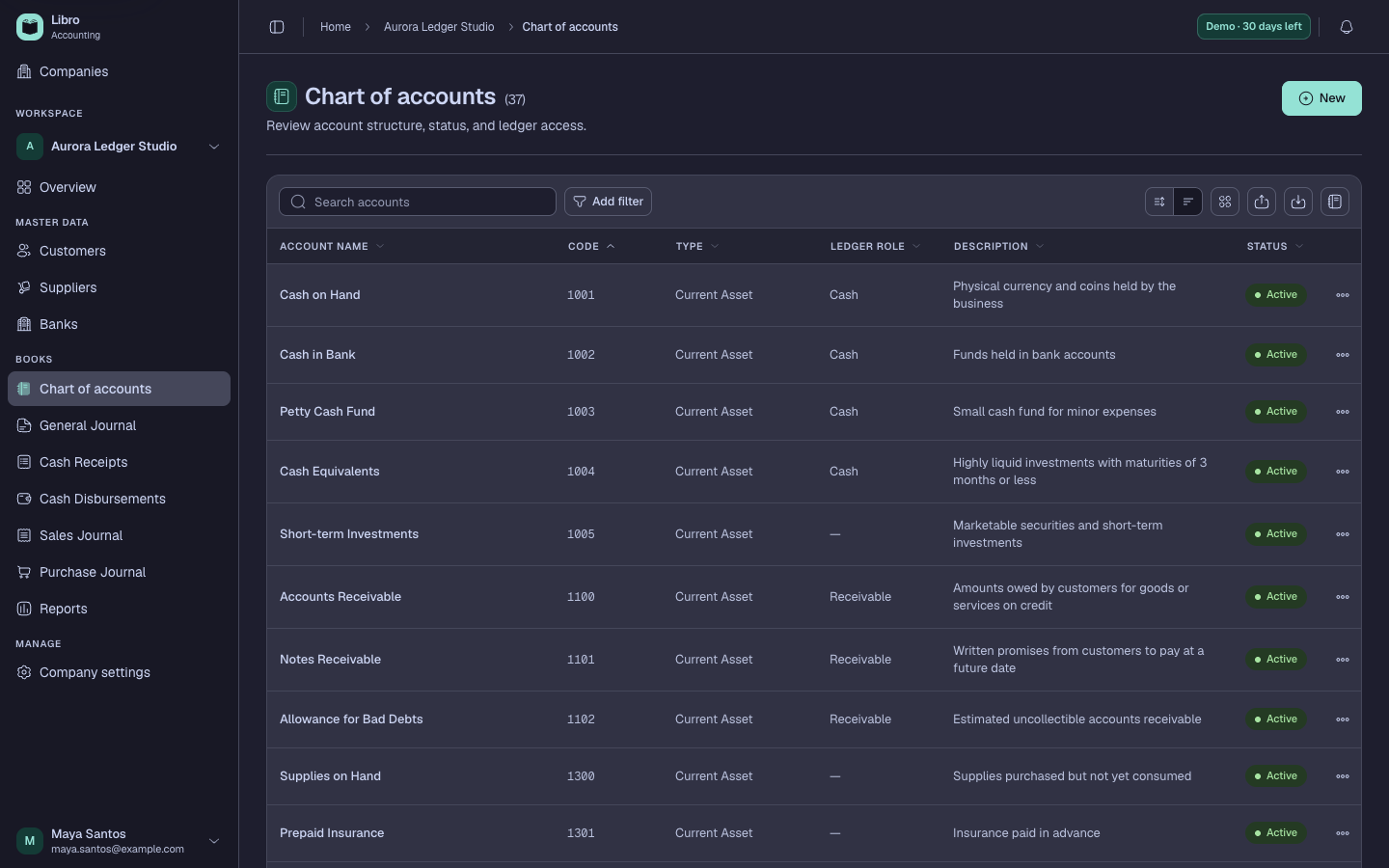
The Accounts page shows all your accounts grouped by type.

Use the search bar to find accounts by name, code, or description.

Account types
Libro organizes accounts into nine types. Each type determines how balances are calculated (debit-normal or credit-normal) and where accounts appear in your financial reports.
Assets
| Type | Code Range | Examples |
|---|---|---|
| Cash | 1000-1099 | Cash on Hand, Cash in Bank, Petty Cash |
| Current Asset | 1100-1399 | Accounts Receivable, Inventory, Prepaid Rent |
| Noncurrent Asset | 1500-1799 | Land, Building, Equipment |
Asset accounts have debit-normal balances. Debits increase the balance, credits decrease it.
Liabilities
| Type | Code Range | Examples |
|---|---|---|
| Current Liability | 2000-2399 | Accounts Payable, Salaries Payable, VAT Payable |
| Noncurrent Liability | 2500-2599 | Long-term Loans, Mortgage Payable |
Liability accounts have credit-normal balances. Credits increase the balance, debits decrease it.
Equity, Revenue, and Expenses
| Type | Code Range | Examples |
|---|---|---|
| Equity | 3000-3299 | Owner’s Equity, Retained Earnings, Share Capital |
| Revenue | 4000-4199 | Service Revenue, Sales |
| Other Income | 7000-7099 | Interest Income, Gain on Sale |
| Expense | 5000-6299 | Cost of Goods Sold, Rent, Utilities, Salaries |
Equity and revenue accounts have credit-normal balances. Expense accounts have debit-normal balances.
Adding an account
Click New Account to open the account creation form.

Fields
- Account type (required) determines where the account appears in reports and how balances are calculated
- Code (optional) is a numeric code for organizing and sorting accounts (e.g., 1001, 2105). Must be unique.
- Name (required) is the account name shown throughout the app. Must be unique.
- Description (optional) is a note explaining the account’s purpose, searchable from the accounts list
Editing an account
Click the actions menu on any account and select Edit to modify it.

You can change the code, name, type, and description. The same uniqueness rules apply. Codes and names must be unique within your company.
Account ledger
Click any account name to view its ledger, a detailed log of every transaction affecting that account.

The ledger shows:
| Column | Description |
|---|---|
| Date | When the transaction occurred |
| Entry No. | Links to the journal entry |
| Description | Line or entry description |
| Debit | Amount debited to this account |
| Credit | Amount credited to this account |
| Balance | Running balance after each transaction |
The running balance uses the account type to determine direction:
- Debit-normal (assets, expenses): debits increase, credits decrease
- Credit-normal (liabilities, equity, revenue): credits increase, debits decrease
Deactivating accounts
If you no longer need an account but it has existing transactions, you can deactivate it instead of deleting it.
Deactivated accounts:
- Stay visible in your chart of accounts (marked as inactive)
- Keep their ledger history intact
- Won’t appear in dropdowns when creating new journal entries
- Can be reactivated at any time
To deactivate, click the actions menu and select Deactivate. You’ll need to type the account name to confirm.
Deleting accounts
You can permanently delete an account only if it has no associated journal entries. If the account has been used in any entry, you’ll need to deactivate it instead.
To delete, click the actions menu and select Delete. You’ll need to type the account name to confirm.
Auto-generated accounts
When you create a company, Libro generates accounts based on your setup choices:
By legal structure
- Sole Proprietorship includes Owner’s Equity and Personal Drawings
- Partnership includes per-partner Capital and Drawings accounts
- Corporation includes Share Capital, Retained Earnings, Treasury Shares, Dividends
- Cooperative includes Member Deposits, Share Capital, Reserves, Education Fund
By business type
- Service adds Service Revenue
- Merchandising adds Inventory, Sales, COGS, Purchase Discounts
- Manufacturing adds all merchandising accounts plus Raw Materials, WIP, Factory accounts
By modules
Each module you enable adds relevant accounts:
- Receivables adds Accounts Receivable, Notes Receivable, Allowance for Bad Debts
- Fixed Assets adds Land, Building, Equipment with Accumulated Depreciation
- Payroll adds Salaries Payable, SSS/PhilHealth/Pag-IBIG Payable
- Taxes adds Input/Output VAT, Withholding Tax, Income Tax Payable
- Loans adds Notes Payable, Loan accounts, Interest Expense
Base accounts (always created)
Every company gets these regardless of setup choices:
- Cash includes Cash on Hand, Cash in Bank, Petty Cash, Cash Equivalents
- Liabilities includes Accounts Payable (Trade & Non-Trade), Accrued Expenses
- Expenses includes Rent, Utilities, Office Supplies, Repairs, Transportation, Professional Fees, and more